



How Non-China Users Shop on Tmall
Q1: Can non-China users shop on Tmall?
Yes. Non-China users can shop on Tmall by registering an account with an overseas phone number and using either:
- DIY shopping (you place the order yourself), or
- BuyForMe (BFM) service (comGateway places the order for you).
Q2: What do I need before starting?
Before registering, please prepare the following:
1) Phone Number
- Overseas phone numbers are supported
- Verification is done via OTP (SMS code)
2) Payment Method (DIY users only)
- Alipay (most reliable and recommended)Reference: Alipay for overseas users
- Some sellers may accept international credit cards, but this is not guaranteed
3) China Delivery Address (DIY users only)
Use your comGateway China warehouse address exactly as shown below:
Region (所在地区): 北京市 > 大兴区  [Beijing/Beijing/Daxing District/Ronghua Street]
Address (地址):科创三街隆宝源工业园2号楼易连Your Suite + CGW + Your Name 邮编 100023
Recipient Name (姓名): 康捷威
Postal Code (邮编): 100023
Telephone (电话): 13301205932
Important Address Notes
In the address field, after科创三街隆宝源工业园2号楼易连
please add:Your Suite + CGW + Your Name
Example:科创三街隆宝源工业园2号楼易连 AUX-ABC CGW Peter Chan 邮编 100023
Always enter 康捷威 as the recipient name.
4) Website Translation Tool
- Tmall is mainly in Chinese
- Google Translate or similar tools are strongly recommended
Q3: How do I register a Tmall account?
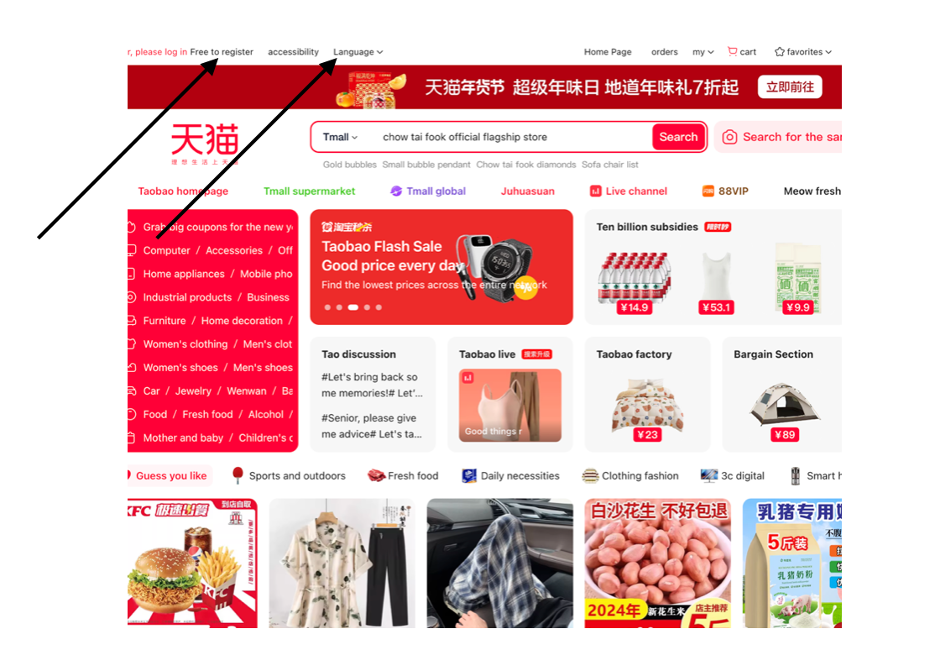
- Go to https://www.tmall.com
- Select Language > English
- Click “Free to register”
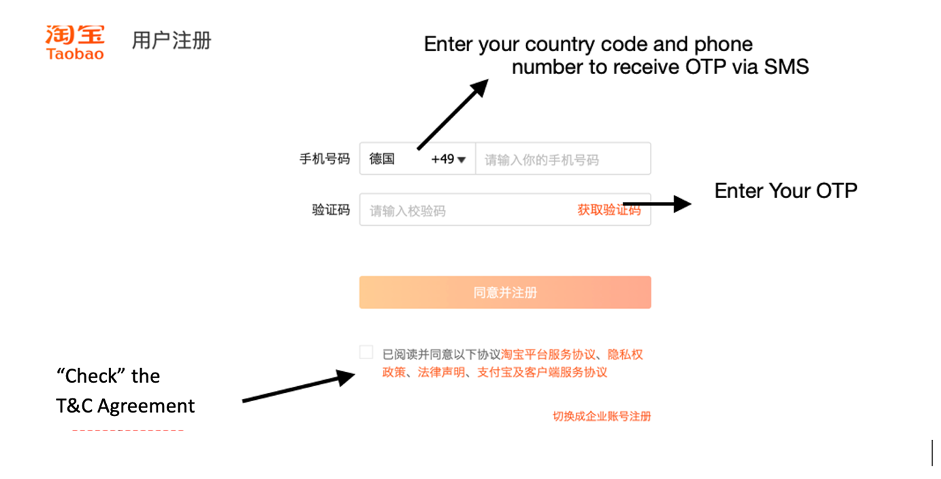
- Enter your phone number and complete SMS verification
Common issues
If you don’t receive the SMS:
- Retry after 30–60 seconds
- Check if your phone blocks overseas SMS
Q4: How do I set up my delivery address?
(For DIY users)
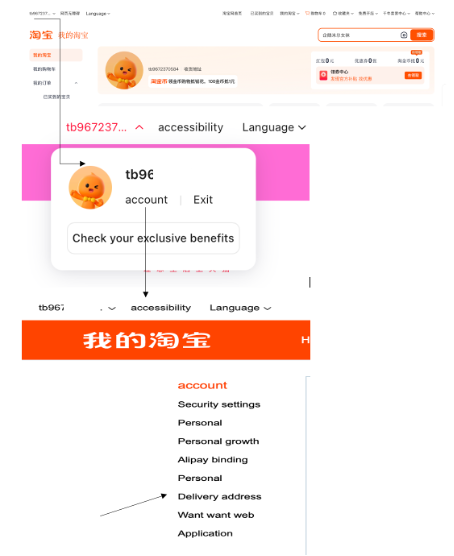
- Go to Account > Address
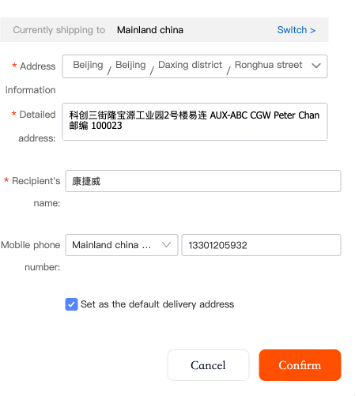
- Paste your comGateway China warehouse address
- Click "Select to set as default delivery address" & click "Confirm" to save the address.
Recipient name: 康捷威
Phone number: 13301205932
Full Chinese address (see Q2)
Q5: How do I search for products on Tmall?
You can shop in two ways:
- Browse Categories -Categories are listed on the left side of the homepage. Useful for brand or general browsing
- Use the Search Bar - Search using Chinese product names. Use Google Translate to find the correct Chinese keywords
- Tips for choosing a good seller
Check seller reputation and years of operation. Read customer reviews and view buyer photos. Review product descriptions carefully
Q6: How do I place an order?
Option A: DIY Shopping
- Click the product
- Select options (color, size, quantity, etc.)
- Click Add to Cart (加入购物车) or Buy Now (立即购买)
Option B: For comGateway BFM user
Create BFM order with the product details and comGateway BFM team will take care of the purchase and its delivery to your comGateway address in China. Your will be notified upon package arrival.
Q7: How does checkout work?
- Go to your cart
- Select the items
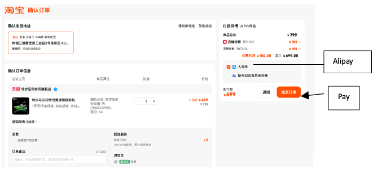
- Click Checkout / 结算
- Confirm:
Shipping address (Your comGateway China address)
Delivery option
Price and vouchers - Click Pay / 提交订单
Q8: How can non-China users pay on Tmall?
Option A: Alipay (Recommended)
- Click Pay at checkout
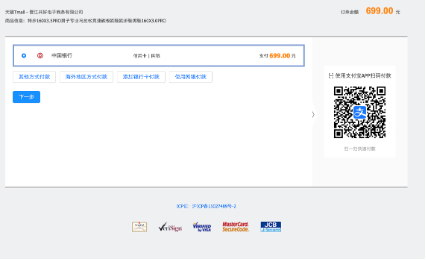
- Redirected to Alipay
- Choose payment method
- Confirm amount
- Payment successful
Option B: International
Credit/Debit Card (Limited)
Some sellers may support:
- Visa
- MasterCard
Availability depends on:
- Seller
- Product category
- Whether international checkout is enabled
If you don’t see card options, that seller does not support it.
Q9: How do I track my Tmall orders?
- Go to My Orders / 我的订单
- Check order status:
- Paid
- Shipped
- Delivered - View courier tracking number
- Optional- Screenshot the order page and update “Expected Deliveries” in your comGateway dashboard

