



Table of Contents
Why I chose the Framework Laptop 13 Intel Core Ultra
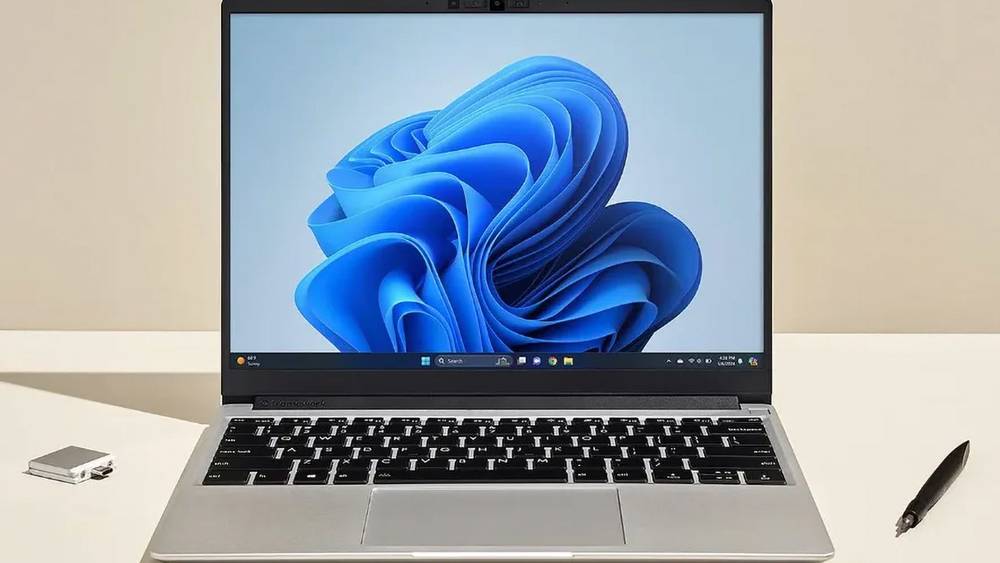
I have always valued the ability to repair my own hardware. In early 2026, my old ultrabook finally started to struggle, and I knew I wanted something that wouldn't end up in a landfill in three years. The Framework Laptop 13 (Intel Core Ultra Series 1) stood out to me because of its modularity. I can swap out ports, upgrade the mainboard, and even replace the battery with a single screwdriver. For a tech hobbyist like me living in Tokyo, having a machine that I can fix myself is a massive advantage.
 Amazon US
The Intel Core Ultra Series 1 chip is particularly impressive because of its efficiency and the integrated AI processing capabilities. I noticed that while the laptop is available in various regions, the DIY edition offers the best value. It allows me to bring my own RAM and SSD, which I already had from a previous build. This level of customization is exactly why the Framework community has grown so rapidly this year.
Cost comparison between US and Japan markets
I did the math before making my purchase. Buying a high-end, pre-built repairable laptop locally in Japan often comes with a steep "import premium" added by local distributors. When I checked the US Framework store, the DIY Edition for the Intel Core Ultra model was listed at a price point that, even with shipping, significantly undercut local alternatives.
In my specific case, I calculated that I could save roughly 45,000 Yen by purchasing the DIY kit from the US rather than waiting for a localized pre-built version or buying a similar spec machine from a traditional brand in Japan. Even after accounting for the consumption tax at the border, the savings remained substantial. I used a shipping calculator to get an early idea of what the total cost would look like, which gave me the confidence to proceed with the US order.
My process for importing from the US
Framework's US store offers the most competitive pricing, but they don't always offer direct shipping to every Japanese address with the best rates. To manage this, I used comGateway to provide me with a tax-free US address. This allowed me to buy the laptop as if I were a US resident, avoiding US sales tax entirely before forwarding it to Japan.
I found that using a freight forwarder was the most efficient way to handle the logistics. Once my Framework Laptop 13 arrived at the warehouse, I was notified immediately. I then chose an international shipping service that offered tracking and insurance, which is vital for high-value electronics. If you are new to this process, I recommend checking the FAQ on their site to understand how duty payments are handled upon arrival in Japan.
Framework Laptop 13 shipping estimates for Japan
When I was planning my shipment, I needed to know the physical specs of the package to avoid any surprises. Laptops are generally dense, which is good for shipping costs because you aren't paying for "air." However, you still need to be aware of how the weight is calculated.
Box weight and dimensions
My Framework Laptop 13 DIY edition arrived in a very sturdy but compact box. Based on my shipment, here are the estimates you should use for your own planning:
- Box Weight: Approx. 6 lbs (2.7 kg) for the DIY kit including the outer shipping carton.
- Box Dimensions: Approx. 15 x 11 x 4 inches (38 x 28 x 10 cm).
- Volumetric Warning: Because this item is relatively heavy for its size, you will likely be charged based on actual weight rather than volumetric weight. However, if you decide to bundle it with large, light items like a laptop sleeve or a plush toy, keep an eye on the volume to ensure your international shipping rates don't spike unnecessarily.
Lithium battery shipping rules
The Framework Laptop 13 contains a lithium-ion battery. This is a critical detail for shipping to Japan. Most carriers allow laptops with internal batteries, but they must be declared correctly as UN3481. I made sure my package forwarding provider was aware of this. Usually, there is a small handling fee for lithium batteries, but they are perfectly legal to ship as long as they are contained within the equipment.
My verdict on the import savings
My experience importing the Framework Laptop 13 in 2026 was seamless. By shopping the US store and using a reliable service to forward packages, I obtained a cutting-edge, repairable machine that wasn't yet available at a reasonable price point in Japan. The 45,000 Yen I saved was more than enough to cover the cost of the high-end RAM and 2TB SSD I installed myself.
If you are looking for a new laptop this year and want to avoid the high local markups in Japan, I highly suggest looking at the US DIY editions. Just be sure to check the current international shipping fees before you buy so you can accurately calculate your total savings. For me, the extra effort of importing was well worth the reward of owning the most repairable laptop on the market.
-
March 06, 2026
Buying a Framework Laptop 13 DIY edition from the US is cheaper than local alternatives in Singapore
The Framework Laptop 13 with Intel Core Ultra Series 1 is a top choice for Singapore tech fans wanting to save money by importing from the USA in 2026.Continue Reading
-
March 06, 2026
Is the Framework Laptop 13 Intel Core Ultra Series 1 worth importing? US DIY vs Hong Kong pre-built laptops
Why pay for a locked-down laptop in Hong Kong? The Framework Laptop 13 Intel Core Ultra Series 1 offers total repairability for 2026 power users.Continue Reading
-
March 06, 2026
Framework Laptop 13 DIY vs Pre-built Options: Essential Insights for Malaysian Tech Imports
Professional logistics overview for importing the Framework Laptop 13 Intel Core Ultra Series 1 to Malaysia, comparing US DIY pricing versus local retail.Continue Reading
-
March 06, 2026
Save $450 on the Framework Laptop 13 Intel Core Ultra Series 1 by shipping it to Australia
Looking for the Framework Laptop 13 Intel Core Ultra Series 1 in Australia? Here is why importing from the US saves you heaps of cash in 2026.Continue Reading
-
March 06, 2026
Can you really save money importing the Framework Laptop 13 Intel Core Ultra to China
A blueprint for tech fans in China to import the Framework Laptop 13 Intel Core Ultra Series 1 using comGateway's tax-free US address and BuyForMe service.Continue Reading

